HubSpot alternatives for email: the gap between $7 and $800, and what fills it
By Mara Levin · Updated October 7, 2026 · Vendor pages and prices checked that day
HubSpot Marketing Hub is a CRM with email, forms and automation attached, and its pricing page lists plans at $7, $800 and $3,600 a month. Teams that look elsewhere are usually stuck in the space between Starter and Professional: they have outgrown ten automated actions and 5x email sends, but do not want to pay $800 for the next step. This page shows what to move to, and what the move involves.
The short answer
A team that wants CRM-style automation without HubSpot's Professional price should price ActiveCampaign. A team that mainly sends newsletters and campaigns can use Mailchimp, MailerLite or Brevo for far less. A company that likes HubSpot's CRM and sending but not its editor can stay and add a builder. If you use HubSpot's free tools for a small list, there is no reason to leave yet.
What HubSpot charges, in two sentences
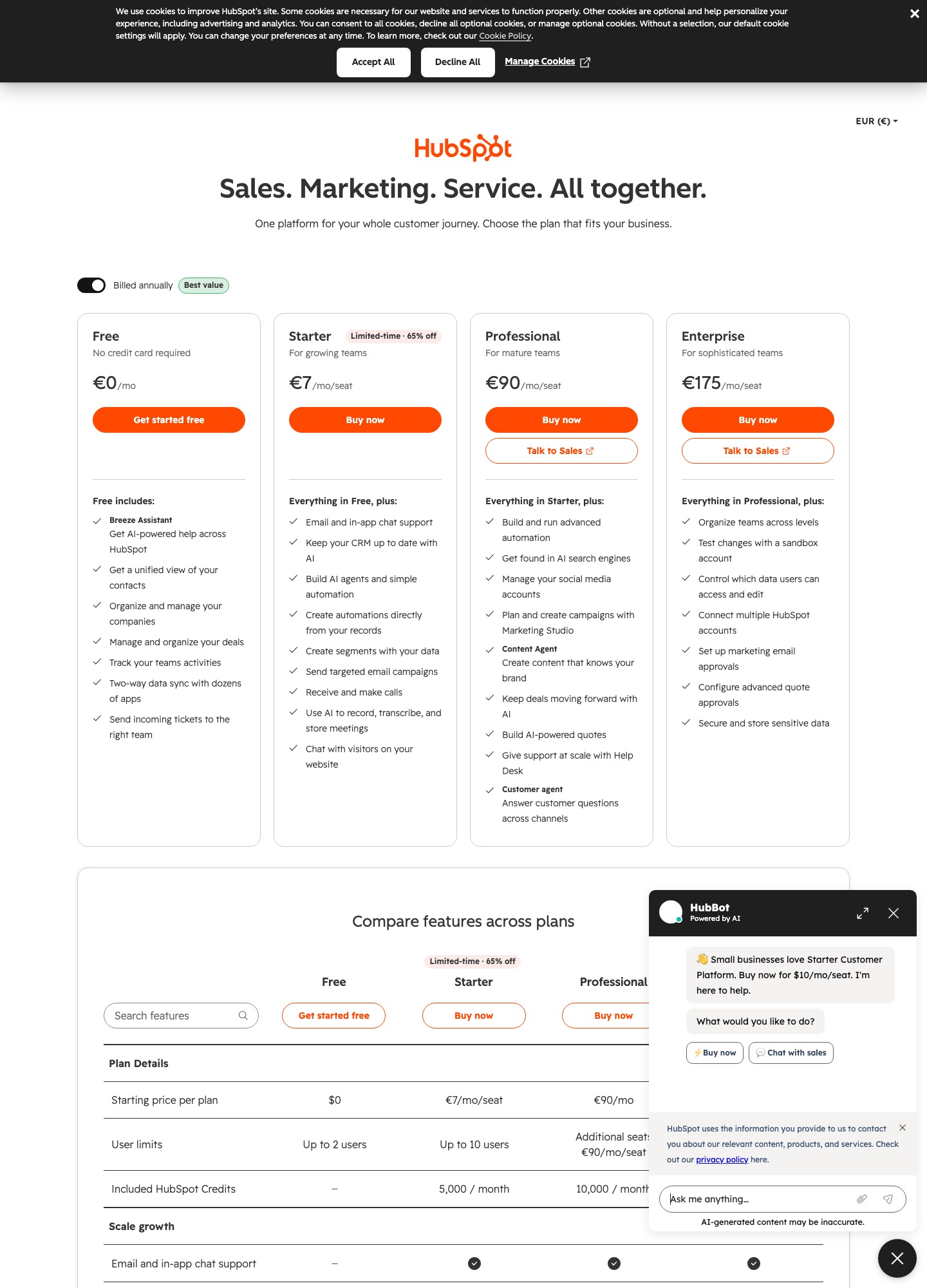
The Marketing Hub pricing page lists free tools, Starter at $7 a month, Professional at $800 and Enterprise at $3,600, and states that the product is priced per seat with a marketing contact tier on top. Email send limits and automation caps change with each plan, and its table, not this page, is the place to read them.
Why teams leave
- Plan steps are far apart. The page reads $7 for Starter, then $800 for Professional, which is more than a hundred times as much. Anything in the feature table that sits only in Professional becomes a big purchase.
- Automation is capped early. Email automation is "1 automated action" on the free tools and "Up to 10 automated actions" on Starter. Unlimited actions arrive with Professional.
- Send limits ride on the contact tier. The feature table gives 2,000 sends per calendar month on the free tools, then 5x, 10x and 20x your marketing contact tier on Starter, Professional and Enterprise. With 2,000 marketing contacts, that is 10,000, 20,000 and 40,000 sends a month, by simple multiplication.
- Branding on the free tier. Free-tool emails carry HubSpot branding, which Starter removes.
- Seats multiply the bill. The pricing is per seat, so a marketing team of five buys five of them.
- Programmable and AI features sit at the top. Programmable email and an AI email template upload (beta, 100 uploads per account per month) are listed under Professional and above.
What to move to, with prices
| Alternative | Entry prices | At 5,000 and 10,000 contacts | Closest to HubSpot's |
|---|---|---|---|
| ActiveCampaign | Starter $15, Plus $49, Pro $79 a month, billed annually | Pro $205 and $375; Plus $145 and $189 | Automation and CRM features |
| Mailchimp | Free, Essentials $13, Standard $20 | Standard $100 and $135 | Campaign email and templates |
| MailerLite | Free; Comfort from $12, Power from $25 | Comfort $49 and $89 | Newsletters and forms |
| Brevo | Free 300 a day; Starter from $9, Standard from $18 | Priced by email volume, not contacts | Email and automation on a budget |
| Customer.io | Essentials from $100 for 5,000 profiles | $100 and $145 | Product-event messaging |
Prices from ActiveCampaign, Mailchimp, MailerLite (monthly billing), Brevo and Customer.io. HubSpot's own prices start at $800 for Professional before contact tiers and seats, so ActiveCampaign Pro at $205 is cheaper at those list sizes. That is a price comparison, and it does not say the two products do the same work: HubSpot's CRM, sales and service products are a different scope.
Who should switch to what
A team using HubSpot mainly for email and simple workflows. ActiveCampaign is the nearest like-for-like on automation depth, and ActiveCampaign vs Drip shows how it handles pricing and where it stops. If your workflows are short and your list is a newsletter, MailerLite and Brevo cost a fraction.
A shop whose data is orders. A CRM is the wrong centre of gravity. See Klaviyo alternatives and the Drip pages.
A SaaS product that needs events. Customer.io starts at $100 for 5,000 profiles and Customer.io vs Loops compares it with a simpler option, Userlist vs Customer.io with a B2B specialist.
A company that wants simpler campaign email than HubSpot offers. Mailchimp alternatives compares the next tier of tools.
The option nobody lists: keep the sender, swap the editor
HubSpot's contact and workflow engine is the hard part to replace, and its email editor is the easy part. A separate builder lets designers work in a tool made for emails and hand over finished HTML. Beefree's FAQ lists a one-click push connector to HubSpot, and Postcards names HubSpot among its export targets. A subscription such as Postcards Plus at $16 or Beefree Professional at $30 adds to the HubSpot bill, and nobody has to migrate a contact. See Beefree alternatives and Mailchimp vs Beefree, which poses the same question about a different sender.
What to save before you leave
- Contacts with their properties. Export lifecycle stage, lead status, owner, source and consent fields, not only the email address. A new tool rarely has the same properties.
- Lists and segments. Write down which are static and which are rules, because rules must be rebuilt by hand.
- Workflows. Screenshot each one with triggers, delays, branches and goals. Expect to rebuild them in the new tool's own terms.
- Email HTML. Keep the source of every template and recurring email, with images downloaded.
- Unsubscribes and bounces. Export them and import them as a suppression list so nobody who opted out is mailed again.
- Reports. Export the campaign history you need for finance or clients, since the history stays with HubSpot.
- CRM links. If sales uses HubSpot deals alongside marketing email, decide where contacts live first. Moving email alone breaks the link between a deal and an email's opens.
How the move goes
Decide where the contact record lives before you touch email. Move the list in one pass, with the suppression list first, then rebuild automations in order of revenue and run old and new side by side for a full cycle. Authenticate the new sending domain with SPF and DKIM before anything is sent. Keep HubSpot's free tools on the account afterward, because the page lists them at no cost, so history stays readable while you finish.
Stay if…
- Sales and marketing share one HubSpot contact record that your team lives in.
- You are on Starter or the free tools and the limits fit your list.
- You need Professional's programmable email or unlimited automation, and no cheaper tool has your integrations.
FAQ
Is HubSpot email marketing free?
Partly. The Marketing Hub pricing page lists free tools at no cost, and its feature table gives that tier 2,000 email sends per calendar month with HubSpot branding. Starter, at $7 a month, removes the branding and raises the send limit to 5x your marketing contact tier, but caps email automation at up to 10 automated actions.
How big is the jump from Starter to Professional?
On the Marketing Hub page, Starter reads $7 a month, Professional $800 and Enterprise $3,600. Professional lifts email sends to 10x the contact tier, allows unlimited automation actions and adds programmable email and an AI email template upload in beta. Teams that want the automation but not the rest are the ones comparing ActiveCampaign, whose Pro is $205 at 5,000 contacts on annual billing.
Why does the screenshot show euros when the text shows dollars?
The capture session was served HubSpot's euro version of its plans view, which lists €7 per seat for Starter, €90 for Professional and €175 for Enterprise. Those are not the Marketing Hub figures. The dollar prices in this article come from the Marketing Hub page on hubspot.com/pricing/marketing, read separately in USD. The caption on the image says which currency it shows.
Can I keep my contacts in HubSpot and send email somewhere else?
The pricing page lists free tools, so a contact database can sit in HubSpot's free tier while you try another sender. Whether a given sender syncs with HubSpot depends on that sender's integration list, which is what to check before you commit. A builder is a safer first step: Beefree's FAQ lists a one-click push connector to HubSpot, and Postcards names HubSpot as an export target.