Userlist vs Customer.io: built around companies, or built around profiles?
By Mara Levin · Updated October 7, 2026 · Vendor pages and prices checked that day
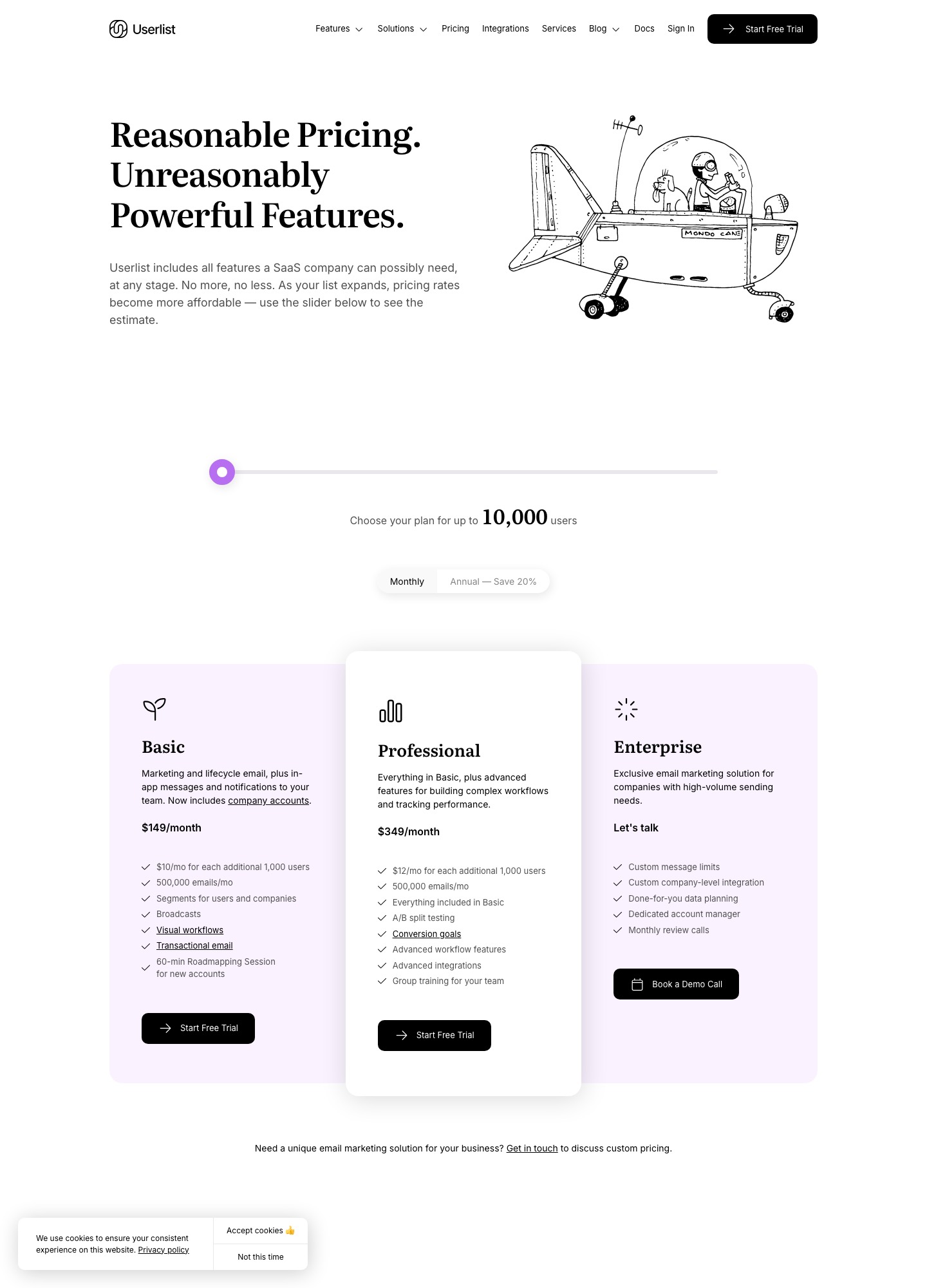
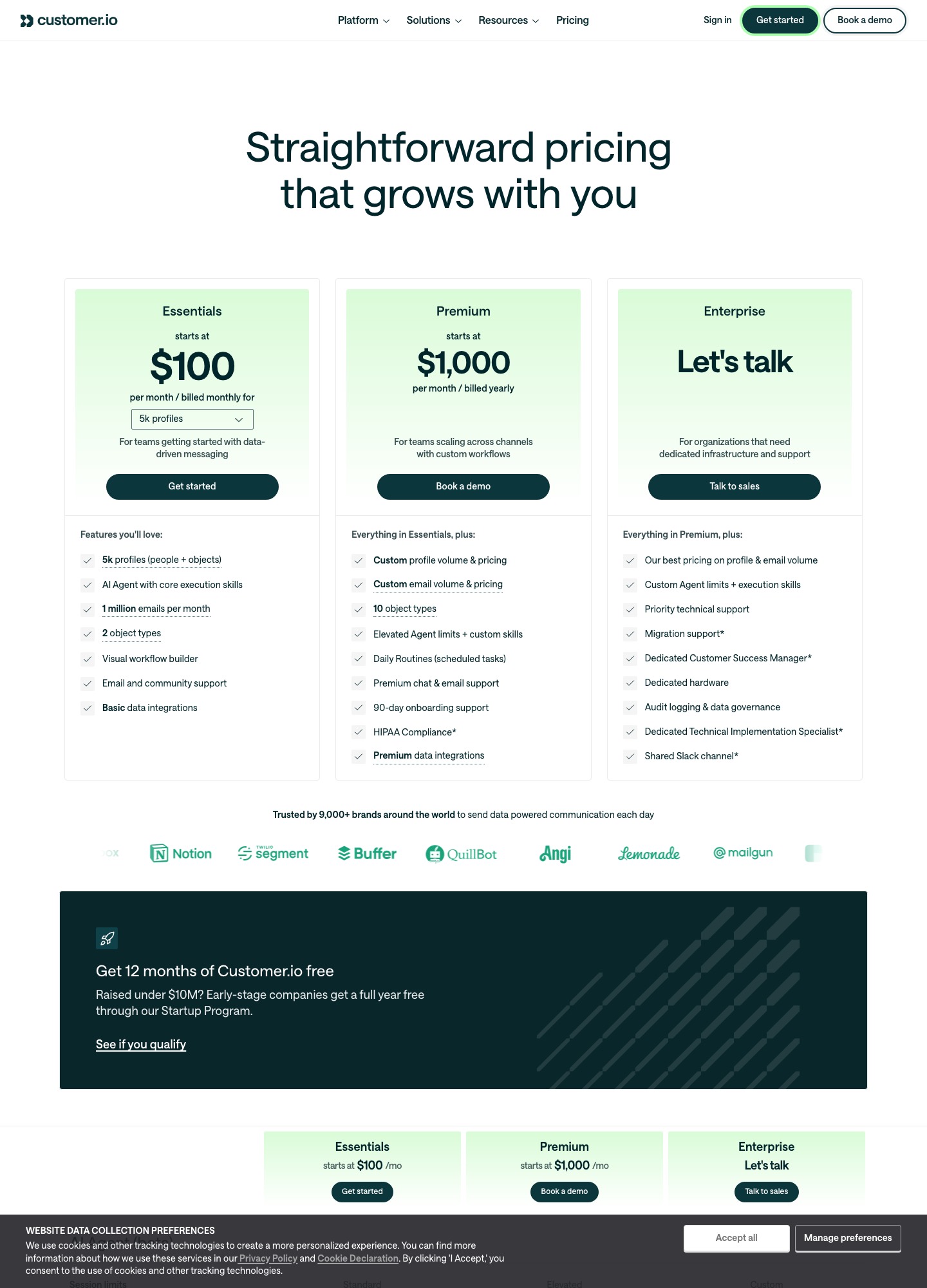
If you sell to teams and want messages to follow the company as well as the person, Userlist makes company accounts a first-class part of Basic at $149 a month for up to 10,000 users. Customer.io gives you a more general data model, with companies stored as object profiles, from $100 a month at 5,000 profiles. They cost about the same at 10,000, and diverge in what you have to build.
The short answer
Choose Userlist when your product has teams and the unit you talk about is the company: its pricing page lists company segments, company profiles with an activity feed and company-triggered campaigns. Choose Customer.io when you want one profile store that handles people, objects and several channels, you have engineers to shape the data, and per-profile pricing suits your list. Early-stage teams should read the startup offers below first, since both vendors publish one.
The two at a glance
| Question | Userlist | Customer.io |
|---|---|---|
| Entry price | Basic $149 a month, up to 10,000 users | Essentials $100 a month, 5,000 profiles |
| Higher tier | Professional $349 a month at 10,000 users | Premium from $1,000 a month, billed yearly |
| Growth rate | $10 a month per extra 1,000 users (Basic); $12 (Professional) | $0.009 per extra profile; extra 1,000 emails $0.12 |
| Email volume | 500,000 emails a month on both plans; overage $1 per 1,000 messages | 1 million emails a month included on Essentials |
| Company model | Company accounts, many-to-many relationships, company segments | Object profiles: 2 object types on Essentials, 10 on Premium |
| Trial | 14 days, card required up front | No trial length stated on the pricing page; it offers Get started and Book a demo |
| Startup offer | 50% off 12 months if under $500k raised | 12 months free if under $10M raised |
Sources: userlist.com/pricing, Userlist billing docs and customer.io/pricing, read on October 7, 2026.
How each one thinks about a company
Userlist's pricing page describes Basic as marketing and lifecycle email plus in-app messages and notifications to your team, and adds that it "now includes company accounts." Its feature table names the pieces: company-level data integration, many-to-many relationships between users and companies, company profiles with an activity feed, company segments and company-triggered campaigns. In practice that means an admin and four members of the same customer can be one audience, and a message can start because the company did something, not only because one person did.
Customer.io's pricing page counts "profiles (people + objects)" and lists object types as a plan feature: two on Essentials, ten on Premium. An object is the generic way to represent something other than a person, such as a company or a workspace, and people can be related to it. That is flexible, since you can model subscriptions or projects as well, but it is a modeling job. You decide what an account object contains, how users attach to it and which events update it, and every object counts toward your profile total.
What each costs at three list sizes
Userlist bills users and Customer.io bills profiles, so the comparison below is about equal counts rather than equal definitions. Userlist's figures after 10,000 come from its published rate of $10 a month per extra 1,000 users on Basic and $12 on Professional; the slider's own readouts, such as $229 at 18,000 users and $369 at 32,000, match that arithmetic. Customer.io's figures are the pricing page's selector readouts for Essentials, billed monthly.
| Count | Userlist Basic | Userlist Professional | Customer.io Essentials |
|---|---|---|---|
| 5,000 | $149 (10,000 included) | $349 (10,000 included) | $100 |
| 10,000 | $149 | $349 | $145 |
| 20,000 | $249 ($149 + 10 x $10) | $469 ($349 + 10 x $12) | $235 |
| 30,000 | $349 ($149 + 20 x $10) | $589 ($349 + 20 x $12) | $325 |
Two things sit under those numbers. Userlist's billing documentation says every plan includes a monthly message allowance of five times your tracked users, with a floor of 500,000, and charges $1 per 1,000 messages beyond it. Customer.io's Essentials includes 1 million emails a month and lists extra emails at $0.12 per 1,000, so a high-volume sender sees different overage economics. And the unit gap matters: if your B2B product has 5,000 people in 800 companies, Customer.io may count the company objects too, while Userlist's count is of users.
Startup offers
For an early product these can outweigh everything above. Userlist's pricing FAQ offers a 50 percent discount for 12 months to SaaS companies that have raised less than $500k in total, for new accounts only. Customer.io's pricing page says companies that have raised under $10M get a full year free through its Startup Program. A bootstrapped team could be eligible for both, in which case the real comparison is what each costs in month 13. Check the eligibility terms with the vendors, because the pages state a rule, not an approval.
Getting billing and product data in
Userlist's integrations page lists Stripe and Chargebee under Billing, without the "Native" badge it gives to tools such as Segment and Zapier, and groups two payment-recovery products next to them. The page does not say which fields sync, so ask for the field list before you design segments on plan or MRR. For Customer.io, the pricing page mentions basic data integrations on Essentials and premium ones on Premium; read its documentation for how billing events arrive before you assume a ready-made connector.
Whichever you pick, the dependable pattern is the same: your app identifies each user, links them to a company id, and sends named events such as trial_started or seat_added. That is why the tool should fit your team's skills as much as your pricing. The Stripe email integration guide and email tools for Stripe users cover the billing side in detail.
Other real options
- Loops lists a documented Stripe integration, a free plan for up to 4,000 sends to your 1,000 newest contacts, and $99 a month at about 10,000 contacts. It is contact-based, not company-based. See Customer.io vs Loops.
- Encharge lists Stripe and Chargebee integrations and starts at $99 a month for up to 2,000 subscribers (Growth, monthly billing).
- Drip lists a Stripe integration and starts at $39 a month for 1 to 2,500 people. Compare it on Customer.io vs Drip.
Pick Userlist if…
- Your customers are teams, and "email every admin of a company that has gone quiet" is a sentence you expect to use.
- You want company accounts to work from day one and are happy to pay $149 a month for the privilege.
- You qualify for its 50 percent first-year discount for companies under $500k raised.
Pick Customer.io if…
- You have engineers who will model accounts, subscriptions and anything else as profiles and objects.
- Your list is large relative to your revenue and per-profile pricing at $0.009 beyond the included count suits you.
- You qualify for the free year under its Startup Program, and you plan to use more than email.
Moving between them
Neither tool's pricing page describes an automated import from the other, so assume a rebuild. Export people and company relationships as CSV, recreate event names exactly as your app sends them, rebuild the workflows and run both in parallel for a billing cycle. Suppression lists move last, and carelessly handled they send mail to people who unsubscribed.
FAQ
Which is cheaper, Userlist or Customer.io?
At 10,000 the two are almost level: Userlist Basic is $149 a month for up to 10,000 users and Customer.io Essentials is $145 a month at 10,000 profiles. Past that point the gap opens. At 30,000, Userlist Basic works out to $349 ($149 + 20 x $10) and Customer.io Essentials is $325. The units differ, though: Userlist counts users, while Customer.io counts people plus object profiles, so a company modeled as an object adds to its count.
Do both tools discount for early-stage startups?
Both publish an offer, with different terms. Userlist's pricing FAQ says SaaS companies that have raised less than $500k total in funding can get 50 percent off for the first 12 months, for new accounts only. Customer.io's pricing page says companies that have raised under $10M get a full year free through its Startup Program. Read each program's eligibility rules before relying on it, because both are conditions on funding history.
Which one connects to Stripe?
Userlist's integrations page lists Stripe and Chargebee under Billing, without a native badge, and lists two payment-recovery tools beside them. Customer.io's pricing page mentions basic data integrations on Essentials and premium ones on Premium; the pages read did not describe a Stripe connector, so confirm in its documentation how billing events would reach it. For a tool with a documented Stripe event list, see the Loops entry on the Stripe users page.
Can I run either with no engineering help?
Userlist is built to be usable by a small team, and its Basic plan includes a 60-minute roadmapping session for new accounts. Customer.io's Essentials plan lists a visual workflow builder and email and community support. Either way, B2B lifecycle email needs a data feed from your app: identify users, tie them to companies, and send events. Budget developer time for that, whichever tool you choose.