Customer.io vs Drip: which lifecycle email platform fits your data?
By Mara Levin · Updated October 7, 2026 · Prices and docs checked that day
Both automate email from customer behaviour. Customer.io is built around events and attributes from a product; Drip is built around people and purchases from a store. That difference decides most of what follows.
Short answer
Choose Customer.io when the messages you care about are triggered by what users do inside a product, such as signing up, inviting a teammate or hitting a limit. Choose Drip when they are triggered by what shoppers do in a store, and when a $39 entry price matters. If you only send a handful of lifecycle emails and write your own HTML, either works, and the editor you prefer for custom code should break the tie.
Side by side
| Question | Customer.io | Drip |
|---|---|---|
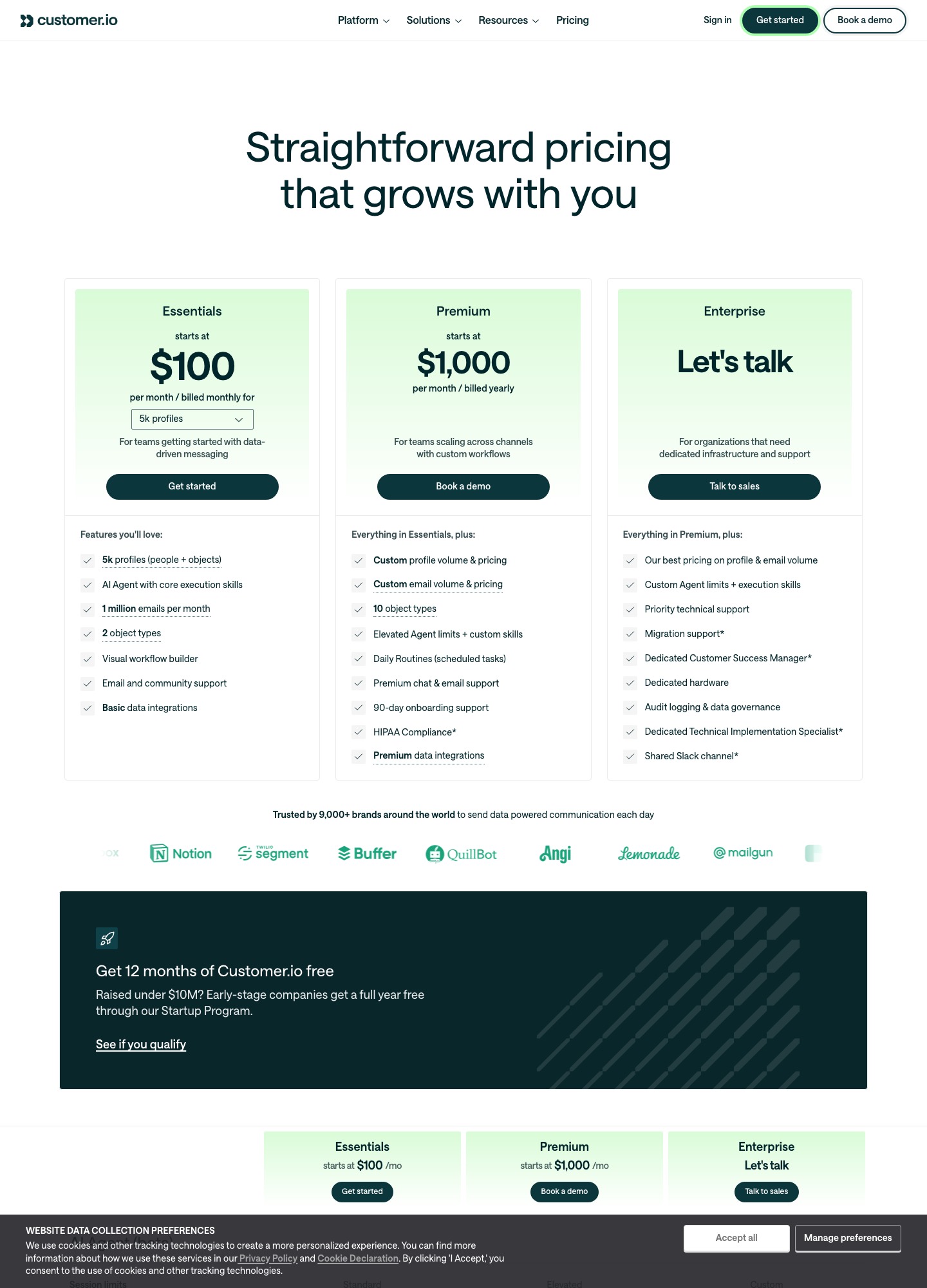
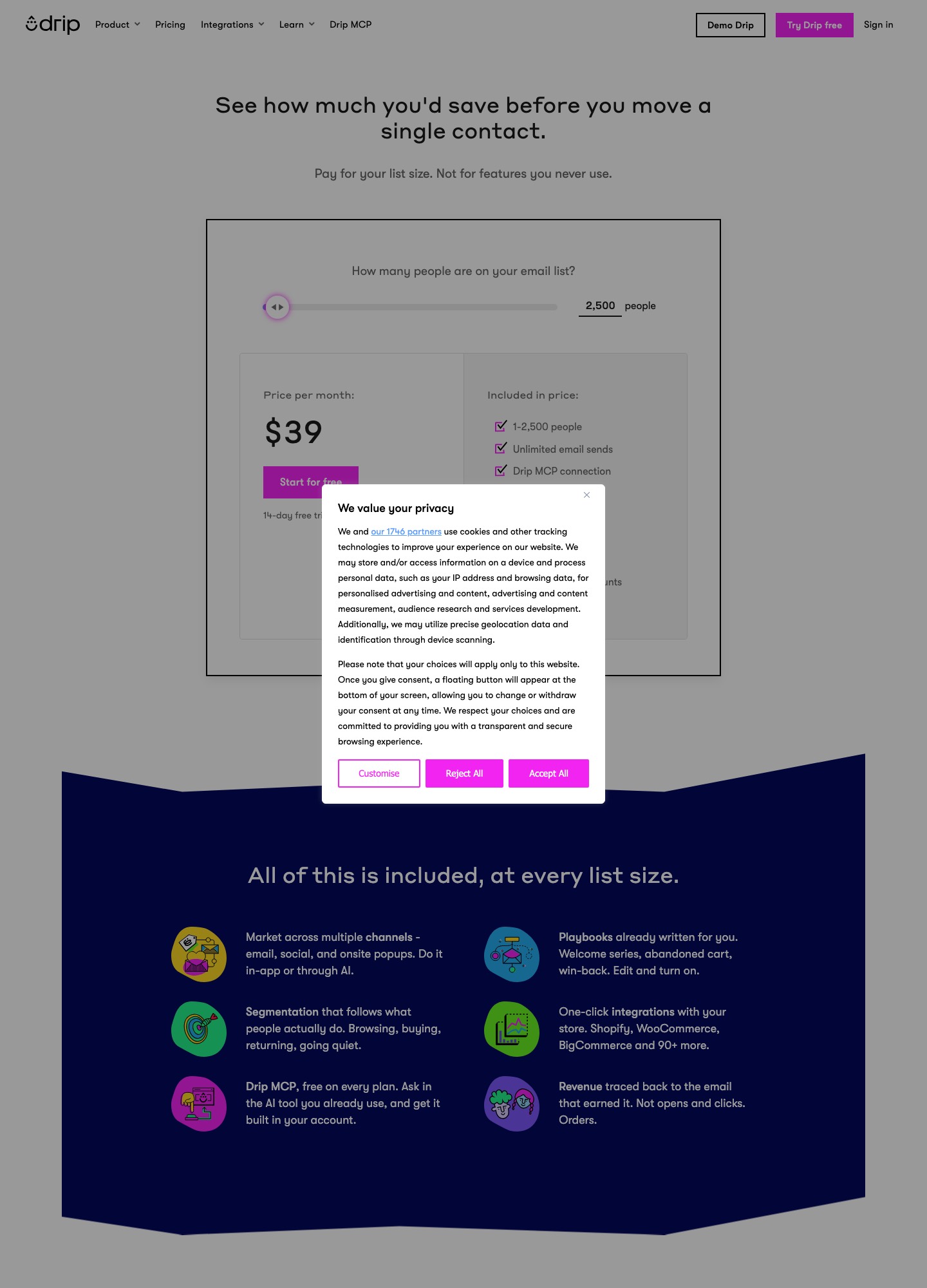
| Starting price | Essentials from $100 a month, billed monthly, for 5k profiles | $39 a month for 1 to 2,500 people |
| What the price counts | Profiles (people plus objects) and email volume | Active people and monthly email volume |
| Email sends at the entry tier | 1 million a month included | Unlimited, per the pricing page |
| Next step up | Premium from $1,000 a month, billed yearly | Higher tiers by active people; check Drip's pricing page for your list size |
| Free option | 12 months free through the Startup Program for companies that raised under $10M | 14-day trial, no credit card |
| Automation limit at entry | Visual workflow builder, 2 object types | Up to 50 workflows, dynamic segments, onsite campaigns |
| Named integrations | Basic data integrations at Essentials; premium ones at Premium | Shopify, WooCommerce, BigCommerce, Stripe, Typeform, Zapier |
| Custom HTML | Design Studio code editor, with HTML, CSS, components and MJML | Custom HTML editor inside the Text Builder |
What you actually pay
At the entry tiers the arithmetic favours Drip. $39 for 2,500 people works out to $15.60 per 1,000 people. Customer.io's $100 for 5,000 profiles is $20 per 1,000, and that comes with a million emails a month rather than Drip's unlimited sends, which only matters if you send very heavily to a small list. Comparing the starting points each page displays, a 2,500-person list costs $39 on Drip, while the Essentials configuration shown on Customer.io's page is $100 for 5k profiles.
Two cautions keep that from being the whole story. The billing units are different: Drip counts active people, while Customer.io counts profiles, which include objects such as accounts or companies. A B2B product with ten people per account may use profiles faster than a store with the same number of shoppers. And above the first tier you are comparing quotes, not list prices: Drip's page prices by people and volume and Customer.io's Premium has custom profile volume and pricing. Run each vendor's own pricing page with your actual list size before you decide.
If your company has raised under $10M, Customer.io's Startup Program offers 12 months free. That can change the first-year comparison completely; the 12-month clock then makes the second-year price the one to model.
Data model: events and objects versus people and purchases
Customer.io starts from people and the events they generate, then lets you attach objects, which are non-person records such as companies or workspaces. Essentials includes two object types and Premium ten, so a SaaS that wants to message "the admin of an account whose trial ends in three days" has somewhere to put the account. Its pricing page also lists GDPR, CCPA and ISO 27001 compliance and US and EU data centres, which matters if EU residency is a requirement.
Drip starts from the store. Its pricing page lists Shopify, WooCommerce, BigCommerce, Stripe, Typeform and Zapier, behaviour-based automations, dynamic segmentation, onsite pop-ups and ecommerce revenue attribution. Browse, cart and order data arrive through the store integration, which saves you writing the event plumbing; the cost is that non-commerce behaviour is awkward to model.
A useful test is to write the first three flows you want. If the triggers read like "created a project", "invited a teammate", "stopped using feature X", you are describing events and Customer.io fits. If they read like "abandoned cart", "first order shipped", "repeat purchase due", you are describing commerce and Drip fits. Our guide to SaaS onboarding sequences and the comparison Userlist vs Customer.io go deeper on the SaaS side, and ActiveCampaign vs Drip covers the store side.
Custom HTML: where this site's question gets interesting
Customer.io
Customer.io's editor guide describes Design Studio as having a visual, block-based editor and a code editor you can switch to. Its MJML page says you turn MJML on under Transformers, Framework, or by giving the message file a .mjml extension. You can also create components in MJML, though you cannot put MJML inside a component. Older editors still exist: drag-and-drop, rich text and a code-only editor, and switching a rich-text email to code-only cannot be reverted once you save.
For a team that already compiles templates, this is the stronger story. You can author MJML where you already work, paste or import it into the code editor, and keep Liquid personalisation in the template. If you are choosing between MJML and React Email, our MJML vs React Email comparison shows what each produces.
Drip
Drip's HTML Email Builder help page describes a Custom HTML editor available inside the Text Builder. Its own warning is blunt: if you design there, you are responsible for formatting and CSS, media queries and compatibility with different clients, browsers and devices. Two rules to know before you paste a template in:
- Switching to Custom HTML deletes the current email content, so build or paste the template into a fresh email.
- You cannot save without an unsubscribe link and a postal address. Drip expects shortcodes like these, and shows an error if either is missing:
<p style="font-size:12px;color:#6b7280">
  <a href="{{ unsubscribe_url }}">Unsubscribe</a><br>
  {{ html_postal_address }}
</p>
Custom fonts work by adding a <style> tag with a CSS @import in the source view, and Drip tells you to keep a web-safe fallback because it cannot guarantee the recipient sees your font. Drip also lets you drop HTML into a visual email through the source-code button, for things like social icons.
Which one to choose
Customer.io is the better fit if
- Your triggers are product events and you already send them from your backend.
- Messages depend on account-level data, which objects model without hacks.
- Your templates are code, especially MJML, and you want to keep writing them that way.
- You may qualify for the 12-month Startup Program offer.
Drip is the better fit if
- Revenue flows start in Shopify, WooCommerce or BigCommerce.
- You want the lowest entry price, $39 a month for up to 2,500 people, and a 14-day trial with no card.
- Marketers will build flows themselves and only occasionally paste in custom HTML.
If you decide to switch
- Inventory first. List every automation, its trigger, its exit rule and the segment behind it. Triggers with similar names rarely behave identically.
- Rebuild one flow, not all of them. A welcome series is a safe first candidate: one entry event, a few waits and one goal.
- Carry your HTML over deliberately. Moving to Drip means adding the unsubscribe and postal-address shortcodes and checking that media queries survive. Moving to Customer.io means deciding between its visual editor, the code editor and MJML.
- Send test messages to real client accounts. The destination platform rewrites links and tracking, so a clean preview inside the editor proves little. Our HTML email builder guide lists the testing tools.
- Check transactional mail separately. If password resets or receipts currently ride on the same account, decide whether they move with the marketing flows. Transactional vs marketing email explains why you might not want them to.
FAQ
Can I send my own HTML templates from Customer.io and from Drip?
Yes in both, with different safety nets. Customer.io has a code editor in Design Studio that accepts HTML, CSS, components and MJML. Drip has a Custom HTML editor inside its Text Builder, where you are responsible for CSS, media queries and client compatibility, and where the email will not save without an unsubscribe link and a postal address shortcode.
Which is cheaper to start with?
Drip, by a wide margin at the entry tier. Its pricing page shows $39 a month for 1 to 2,500 people with unlimited email sends. Customer.io Essentials starts at $100 a month for 5,000 profiles and 1 million emails a month. The comparison flips only if your list is small and your sends are enormous, or if you need object data that Drip does not model.
Does either offer a free plan?
Neither lists an ongoing free plan. Drip offers a 14-day free trial with no credit card. Customer.io offers a Startup Program that gives eligible early-stage companies that raised under $10M 12 months free. Check the eligibility terms on its pricing page before you plan around it.
We use Shopify and also have a SaaS product. Which one?
Pick by where most revenue-driving messages originate. Drip lists Shopify, WooCommerce and BigCommerce among its integrations and reports ecommerce revenue attribution, so store-triggered flows are its home turf. If your most important messages are driven by in-app events and account state, Customer.io fits better, and its objects let you attach non-person data such as accounts or workspaces.