Loops vs Resend: which one should send your product's email?
By Mara Levin · Updated October 7, 2026 · Prices and docs checked that day
They overlap more than their names suggest. Loops started from the marketer's side of a SaaS product and Resend from the developer's, and the bills reflect that.
The short answer
Pick Loops if someone who is not a developer will own onboarding and retention emails, because the editor, audiences and workflows are the product and sending is included in the price. Pick Resend if engineers own the email code, you mostly send transactional messages, and you want a bill based on emails sent rather than people stored. Under 1,000 contacts, both have a free plan good enough to start on, so the choice can wait until it matters.
Prices at a glance
| Plan | Loops | Resend |
|---|---|---|
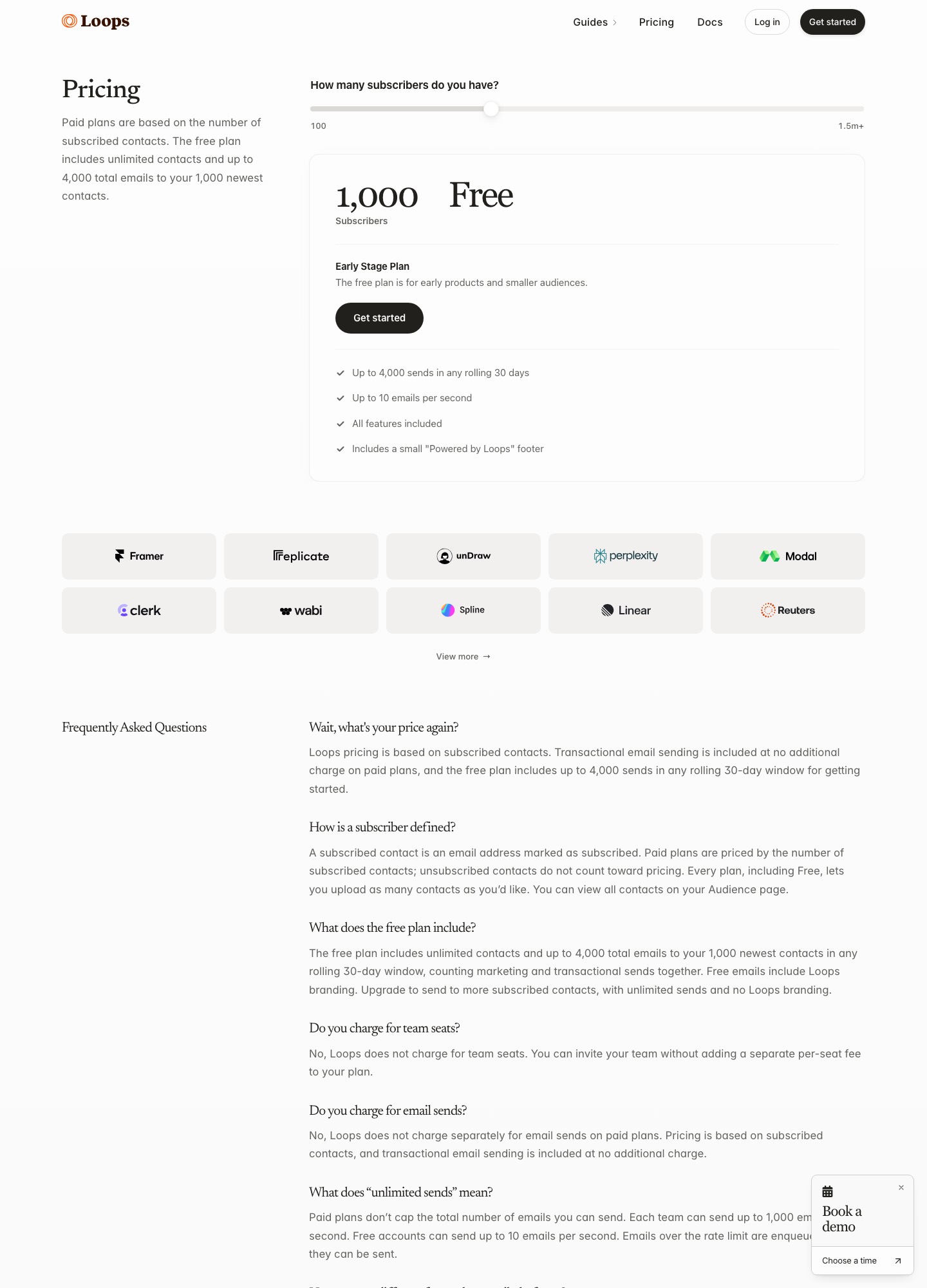
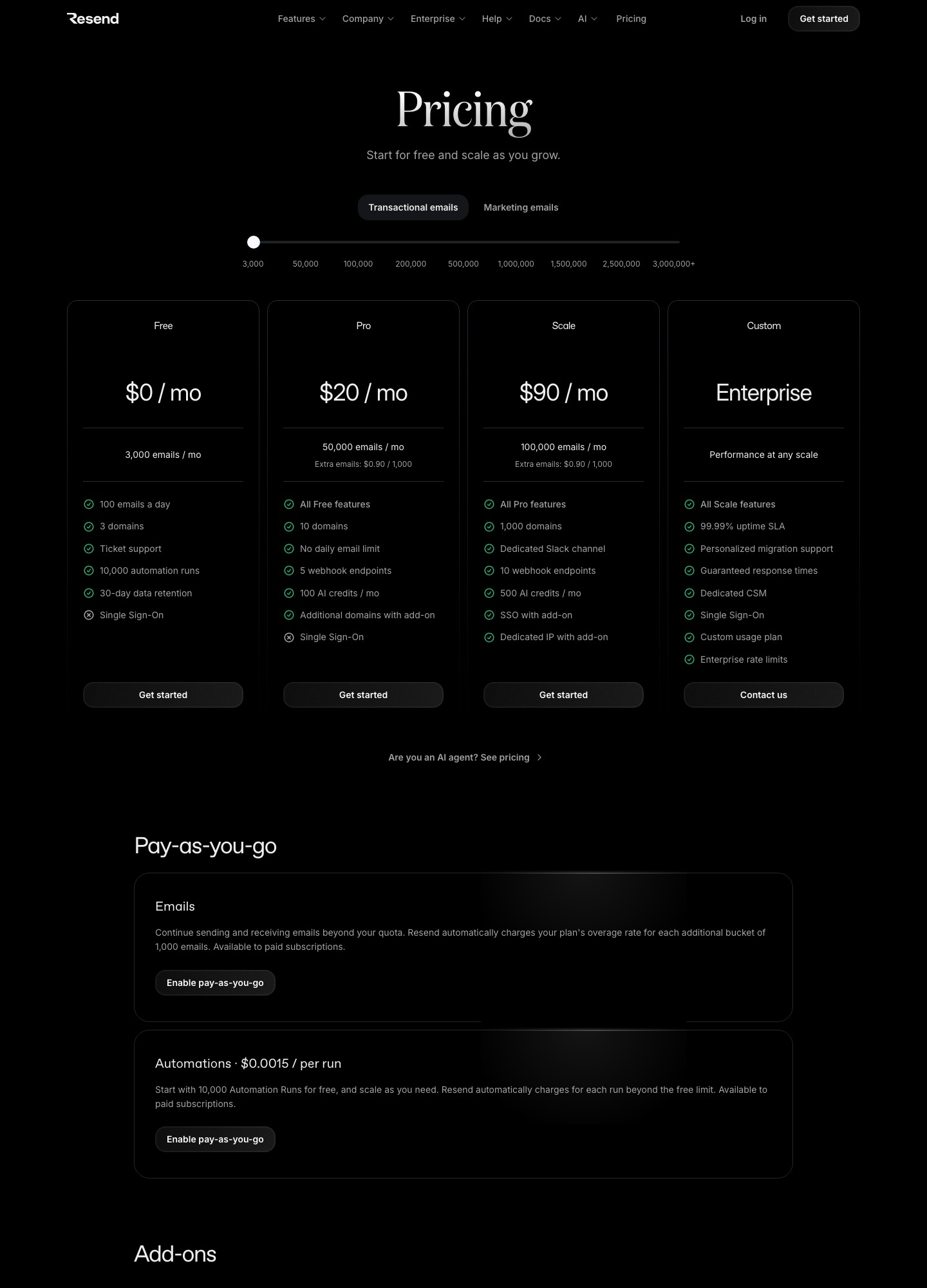
| Free | $0: up to 4,000 sends in any rolling 30 days to your 1,000 newest contacts; "Powered by Loops" footer | $0: 3,000 emails a month, 100 a day, 3 domains |
| Mid | $99 a month at about 10,000 subscribers | Pro, $20 a month for 50,000 emails |
| Larger | $249 a month at about 50,000 subscribers | Scale, $90 a month for 100,000 emails |
| Billed by | Subscribed contacts | Emails sent |
| Extra sending | Unlimited sends to subscribers on paid plans | $0.90 per 1,000 extra emails |
| Automations on the free plan | All features included | 10,000 automation runs |
Loops' paid price comes from the slider on its pricing page, read on October 7, 2026 at 9,998 and 49,989 subscribers. Resend's figures are from its pricing page.
What the money buys
The two numbers are not like for like, and most comparison pages gloss over that. Resend's plans are measured in emails: $20 covers 50,000 of them whether they go to 500 people or 50,000. Loops measures subscribed contacts and then includes unlimited sends to them, together with the editor, workflows and transactional sending to people outside your audience. So one app that mails each of 10,000 users four times a month sends 40,000 emails. That fits inside Resend's $20 Pro plan, against $99 at Loops, but the Loops figure also covers the lifecycle tooling you would otherwise build or buy.
Scale the same app to 50,000 subscribers and 200,000 emails a month. 200,000 emails is a stop on Resend's volume slider, where Scale read $160 on October 7, 2026 (Pro tops out at $35 for 100,000 on that slider, so Scale is the plan at this size). Loops shows $249. The gap narrows because Resend charges for volume while Loops charges for audience size. If your users get one email a month, Resend gets cheaper still; if they get twenty, Loops' unlimited sends become the better deal.
The first integration, side by side
Loops is event-driven. Your app tells it that something happened, and a workflow built in the Loops editor decides which emails follow. This is the documented call to send an event, from the Loops API reference:
curl --request POST \
  --url https://app.loops.so/api/v1/events/send \
  --header 'Authorization: Bearer <token>' \
  --header 'Content-Type: application/json' \
  --data '
{
  "email": "alex@company.com",
  "userId": "usr_7f8e9d0c1b2a",
  "eventName": "signup",
  "eventProperties": {
    "plan": "pro"
  }
}
'
Resend's most direct path is sending a message from code. This is the Node example from the Send Email reference with the idempotency option described on its idempotency keys page:
import { Resend } from 'resend';

const resend = new Resend('re_xxxxxxxxx');

await resend.emails.send(
  {
    from: 'Acme <onboarding@resend.dev>',
    to: ['delivered@resend.dev'],
    subject: 'hello world',
    html: '<p>it works!</p>',
  },
  {
    idempotencyKey: 'welcome-user/123456789',
  },
);
The idempotency key matters because queues retry. Resend checks whether it has already sent an email with the same key in the last 24 hours, so a retried request does not mail the customer twice. The key is carried in an Idempotency-Key HTTP header, and the SDK exposes it as an option, as above. That is a point for Resend if your own code does the sending. With Loops you send an event rather than an email, so duplicate protection comes from how you design the workflow and its entry conditions.
Transactional email on each
Both do it. Loops lets you build a transactional email in its editor, publish it, and call the transactional endpoint with the email address, a transactional ID and your data variables. The call can add the recipient to your audience with addToAudience, and the docs say transactional email goes to any address, whether or not it is in your audience. Its pricing page states that transactional sending is included at no additional charge on paid plans. Resend's transactional path is its core product: send from code, or define a Template once and reuse it.
If your templates come from a builder or framework, note one real difference. Loops lets you bring your own MJML in place of its editor and use data variables inside it, and its docs name Figma plugins that export for it. If you write templates in MJML or React Email, check which tool takes your output without conversion. Resend is made by the team behind React Email, which is the natural fit if your templates are React components.
Lifecycle automation
This is where the products used to be easy to separate, and now they overlap. Resend's documentation describes Automations: a series of steps triggered by custom events from your application, which you can build in the dashboard or through an API, with a run history for debugging. Loops builds its product around workflows, events and audience segments, so that is where its editor and tooling are deepest. If your sequences are short (a welcome email, a nudge after three days), either works. If you need many branches, goals and segments maintained by marketing, Loops is closer to that job.
Choose Loops if…
- A product marketer or founder, not an engineer, will write and change onboarding and retention emails.
- You want sending, workflows and transactional email under one invoice with no per-seat fees.
- Your audience is under 1,000 contacts and you want a free plan that includes every feature, accepting the Loops footer.
Choose Resend if…
- Developers own the email code and want a plain API, idempotency keys and React-based templates.
- Most of your volume is transactional, and a per-email price beats a per-subscriber one.
- You prefer to keep lifecycle logic in your own application, or your sequences are short enough for Automations.
Switching later
The sending domain is the easy part: verify DNS records for the new provider before you move traffic, and keep the old one running during the overlap. The hard part is the automation logic, because event names and workflow conditions do not export. Write down each sequence's trigger, delay, exit condition and suppression rule before you leave, then rebuild one low-risk flow first. For the broader picture of how marketing and transactional streams differ, read transactional vs marketing email, and for other developer-first senders compare Resend vs Postmark and email for transactional use.
FAQ
Can Resend replace Loops for onboarding sequences?
It can, since Resend now has Automations that run a series of steps from custom events your app sends, and its pricing page counts 10,000 automation runs on the Free plan. What you give up is Loops' narrower focus on SaaS lifecycle. Check that Resend's steps, personalisation and run limits cover your longest sequence before you migrate it.
Which one is cheaper for 50,000 users?
On the listed prices, Resend, but the two numbers measure different things. Loops lists $249 a month at 49,989 subscribers with unlimited sends. Resend counts emails: 200,000 a month (four a subscriber) is a stop on its volume slider, where Scale reads $160. Loops' figure includes the marketing app; Resend's does not unless you use its automations.
Do I need both?
Some teams do. A common split is Resend for receipts, password resets and invitations that your code sends, and Loops for onboarding and re-engagement that a product marketer edits. Loops also does transactional email, so only add a second vendor if you want the developer ergonomics or the pricing model of a pure API.
How do I test sending without emailing real people?
Both document a way. Loops says addresses on @example.com and @test.com return normal success responses but nothing is sent, which protects your sending reputation. Resend documents test addresses at resend.dev, including delivered@resend.dev, with variants that simulate a bounce, a spam complaint or a suppressed address.