Resend vs Postmark: which is nicer to build on, and what does it cost?
By Mara Levin · Updated October 7, 2026 · Prices and docs checked that day
Both are developer-first transactional senders with clean REST APIs. Resend leans toward React templates, signed webhooks and idempotent sends. Postmark leans toward stream separation, longer message history and a plan ladder that starts at 10,000 emails.
The short answer
Pick Resend if your stack is TypeScript or React, you want idempotency keys and signed webhooks without extra work, and your volume sits between 3,000 and 100,000 emails where its $0, $20 and $90 plans are cheap. Pick Postmark if you value its explicit message streams, 45-day default message history and inbound processing on its higher plans, and you do not mind securing webhooks with Basic Auth and an IP allowlist. At 50,000 emails Resend's Pro is $20 against Postmark's $55 for Basic.
What you pay at three volumes
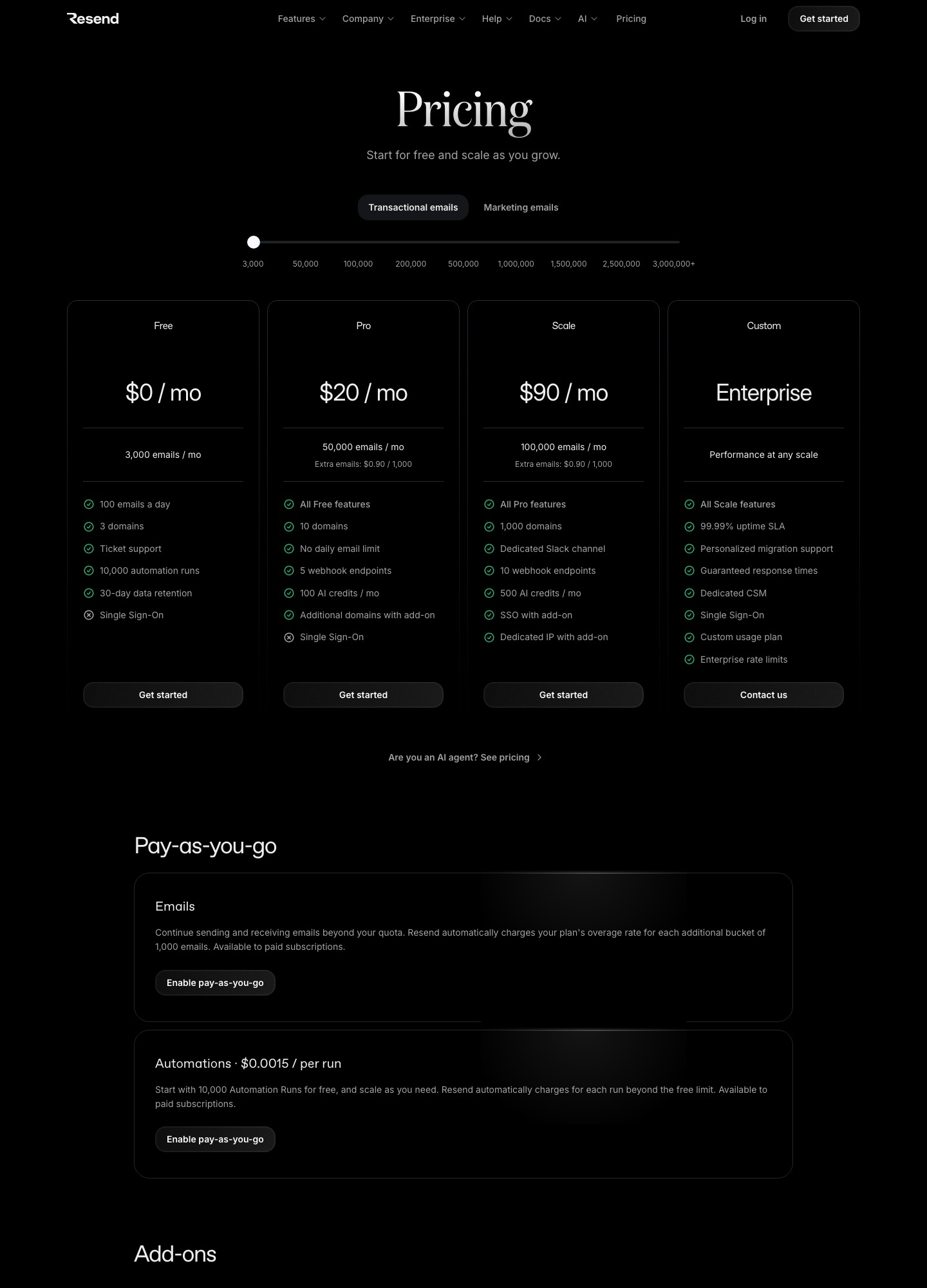
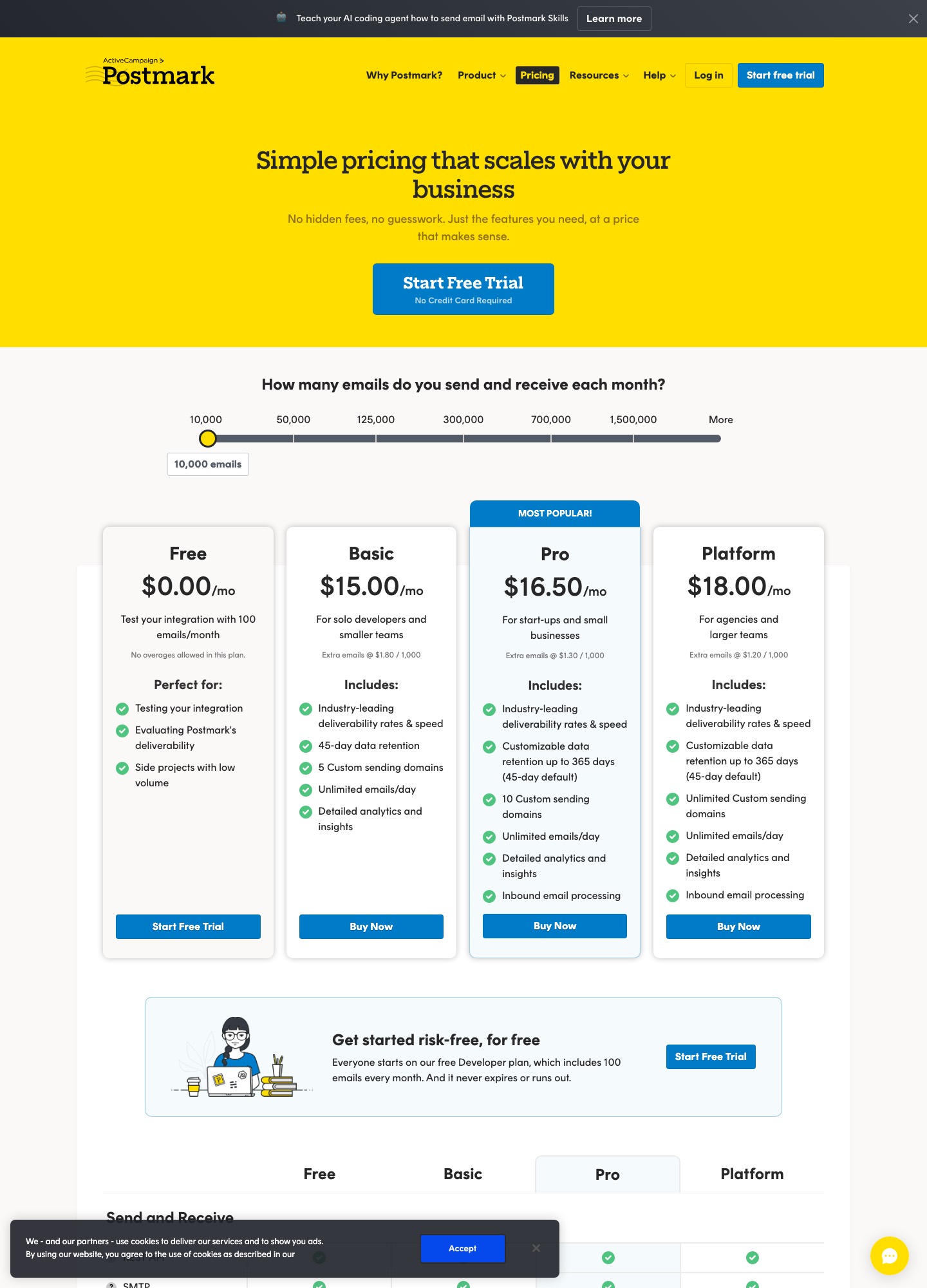
| Emails a month | Resend | Postmark |
|---|---|---|
| 3,000 | Free: $0 (3,000 emails, 100 a day) | Free covers 100 emails a month; smallest paid plan is Basic at $15 for 10,000 |
| 50,000 | Pro: $20 | Basic $55, Pro $60.50, Platform $66 (slider readout) |
| 100,000 to 125,000 | Pro $35 and Scale $90 at 100,000 (slider readout); no 125,000 stop read, and Scale shows $160 at 200,000 | No stop at 100,000; at 125,000 Basic $115, Pro $126.50, Platform $138 (slider readout) |
Resend's numbers are from its pricing page and its volume slider, as displayed on October 7, 2026; the per-1,000 overage rate on its plan cards is not a way to extend a plan price to a volume the slider does not show. Postmark's are what the slider on its pricing page displayed on October 7, 2026.
Reading the cost gap honestly
Resend's lower prices come with limits worth reading. The Free plan caps sending at 100 emails a day, so 3,000 a month only works if you spread it out; a launch-day burst would hit the ceiling. Resend's page shows overage as a pay-as-you-go setting that you switch on from your usage settings, and it describes monthly billing only, with no annual discount. Pro includes 10 domains and 5 webhook endpoints, and Scale raises that to 1,000 domains and 10 endpoints with a dedicated Slack channel. At 100,000 emails the slider shows Pro at $35 against Scale at $90, so Scale pays off for its extras rather than its volume.
Postmark's ladder rises in features, not only in size. Basic costs $15 at 10,000 emails with 5 sending domains and 45-day retention. Pro adds inbound processing, up to 10 domains and a customizable retention window of up to 365 days. Platform has unlimited domains and users. Its page lists overage at $1.80, $1.30 and $1.20 per 1,000 emails for the three plans. Resend lists 30 days of data retention on Free, Pro and Scale, so if you need a retention window beyond that, weigh Postmark's customizable option against the price gap.
The first send, side by side
Resend's quickest path is a published template. Create it in the dashboard, publish it, then reference its ID and pass variables. This is the Node.js example from Resend's templates documentation:
import { Resend } from 'resend';

const resend = new Resend('re_xxxxxxxxx');

await resend.emails.send({
  from: 'Acme <onboarding@resend.dev>',
  to: 'delivered@resend.dev',
  template: {
    id: 'order-confirmation',
    variables: {
      PRODUCT: 'Vintage Macintosh',
      PRICE: 499,
    },
  },
});
The resend.dev sender and the delivered@resend.dev recipient let you try the call before verifying a domain. Template variables must be ASCII letters, numbers or underscores, and four names are reserved: FIRST_NAME, LAST_NAME, EMAIL and UNSUBSCRIBE_URL. If a template is supplied you cannot also send html, text or react, and a missing variable makes the call fail with a validation error rather than mailing a half-filled message.
Postmark's plain send is shorter on setup but stricter on identity. Using the ServerClient from Postmark's send-email docs, a message looks like this:
const result = await postmark.sendEmail({
  From: "sender@acme.example",
  To: "customer@example.com",
  Subject: "Hello from Postmark",
  TextBody: "Hello from Postmark!",
  HtmlBody: "<html><body><strong>Hello</strong> from Postmark!</body></html>",
  MessageStream: "outbound",
});

console.log({ messageId: result.MessageID });
The From address must belong to a confirmed sender signature or Postmark answers with a 422. The docs also describe a test mode: pass POSTMARK_API_TEST as the server token and Postmark validates the request without delivering. Each Postmark server has its own token, so one application's credentials do not unlock another's data.
React Email and templating
Resend's Node.js SDK takes a react property, as in its Next.js guide, where an EmailTemplate component is passed straight to emails.send. Its pricing page lists React Email among the sending features, and React Email is open source at react.email. The Postmark docs I read show no equivalent parameter. Postmark accepts HTML, plain text or a stored template addressed by TemplateAlias and filled from a TemplateModel, and its pricing table lists an email template editor and import tool. So with Postmark you render React components to HTML first, which is easy but one more step. Comparing component toolkits is a separate decision; see MJML vs React Email and React Email vs Maizzle, and the React developers guide.
Idempotency and retries
Resend's send-email reference documents an Idempotency-Key header: Resend remembers a key for 24 hours and uses it to avoid sending the same email twice, which protects you when a worker times out and retries. The Postmark send-email documentation I read does not describe an equivalent, so with Postmark you keep your own record of what has been sent, for instance keyed by your order or user event. Its sample webhook handler takes the same approach for incoming events, storing each MessageID and returning "duplicate" on a repeat. If your jobs retry aggressively, this is a real design cost on one side. The Loops vs Resend page shows the Resend option in a code sample.
Webhooks, signing and receiving
Resend creates and manages webhooks from the dashboard, API, SDK or CLI, and gives each endpoint a signing secret. Its docs say to verify requests with the SDK or the Svix libraries, and they cover replaying an event your endpoint missed and listening for events locally while you develop. Endpoint counts follow the plan: 1 on Free, 5 on Pro, 10 on Scale. Postmark's docs say plainly that it does not sign webhooks and recommend HTTP Basic Auth in the URL plus an IP allowlist; when you save a webhook it tests each enabled event type and expects a 200.
Receiving works on both. Resend accepts inbound mail at a verified domain or at an <id>.resend.app address, notifies you by webhook, and lets you fetch the full content and attachments. Postmark turns inbound mail into a JSON object posted to your URL, and its pricing page lists inbound processing on Pro and Platform.
Streams, domains and IPs
Postmark's MessageStream field routes each message to the transactional or the broadcast side, and its streams page says the two use separate IP ranges. Resend's docs list Broadcasts, Contacts and Automations next to sending, and its pricing page includes 10,000 automation runs on Free, then $0.0015 per run if you enable pay-as-you-go. Domains differ too: Resend gives 3, 10 and 1,000 across Free, Pro and Scale, and sells 100 more for $20 a month. A dedicated IP costs $30 a month on Resend for Scale customers above 3,000 emails a day, and from $50 a month per IP on Postmark for senders at 300,000 a month or more on Pro or higher.
Choose Resend if…
- Your team writes React or TypeScript and wants templates, idempotency keys and signed webhooks without extra libraries.
- You send under 100,000 emails a month and want a plan price that stays flat as volume climbs from 3,000 to 50,000.
- You want to start free and verify a domain only when you are ready.
Choose Postmark if…
- You want separate transactional and broadcast infrastructure selected per message, and 45 days of message history from the start.
- Inbound processing and customizable retention matter more than the lowest monthly figure.
- You are comfortable protecting webhook endpoints yourself and tracking sent events in your own database.
Switching between them
Start with DNS: authenticate the new sending domain and keep the old provider live while reputation builds. Rebuild templates next, since Resend takes values in a variables object (its docs use upper-case names like PRODUCT) while Postmark reads a TemplateModel. Then change webhook handling, adding signature checks when moving to Resend or Basic Auth and IP rules when moving to Postmark. Import suppressions before sending anything. If you are also weighing SendGrid, read Postmark vs SendGrid, and for API-first buyers the API-first email notes cover the wider shortlist.
FAQ
Which is cheaper, Resend or Postmark?
At 50,000 emails a month Resend's Pro plan is $20 and Postmark's slider reads $55 for Basic. Resend's slider shows Pro at $35 for 100,000 emails, while Postmark has no stop at 100,000 and reads $115 for Basic at 125,000; I did not read a Resend stop at 125,000, so compare both sliders at your own volume. At 3,000 emails Resend's Free plan costs nothing while Postmark's smallest paid plan starts at 10,000 emails for $15. Resend is lower wherever both vendors show a price here, but the two plans include different things.
Does Postmark support idempotency keys like Resend does?
In the Postmark send-email documentation I read, there is no idempotency key; its sample webhook handler de-duplicates events by MessageID in your own database. Resend documents an Idempotency-Key header, exposed in the SDK as an option, and says keys expire after 24 hours. If your queue retries failed jobs, plan your own sent-record with Postmark.
Can I use React Email components with both?
Resend's Node.js SDK accepts a react parameter, and its pricing page lists React Email among its sending features. Postmark takes HTML, text or a stored template, so with Postmark you would render your React Email components to HTML in your own code first. React Email itself is open source at react.email and is not tied to either vendor.
Which one makes webhooks safer to receive?
Resend signs webhook requests and documents verifying them with its SDK or Svix libraries. Postmark says it does not sign webhooks, so protect the URL with Basic Auth and an IP allowlist and treat the payload as untrusted until validated. For a team with a strict security checklist, this is the clearest difference between the two.