SendGrid vs Mailgun: a bundled platform or a sending API?
By Mara Levin · Updated October 7, 2026 · Prices and docs checked that day
Both deliver application email over an API or SMTP. The difference is what surrounds the sending: SendGrid sells a marketing product next to its Email API, while Mailgun sells sending, receiving and validation and tells you to bring your own campaign tool.
The short answer
Choose SendGrid if the same account has to send receipts and also run segmented campaigns with a free starting allowance for contacts, or if your company already buys from Twilio. Choose Mailgun if you only send and receive application email, want a plain monthly price at 10,000, 50,000 and 100,000 emails, and care about inbound routing and per-plan log retention. If price per email is your only criterion, put Resend and Postmark on the shortlist too before deciding.
Plans side by side
| Item | SendGrid | Mailgun |
|---|---|---|
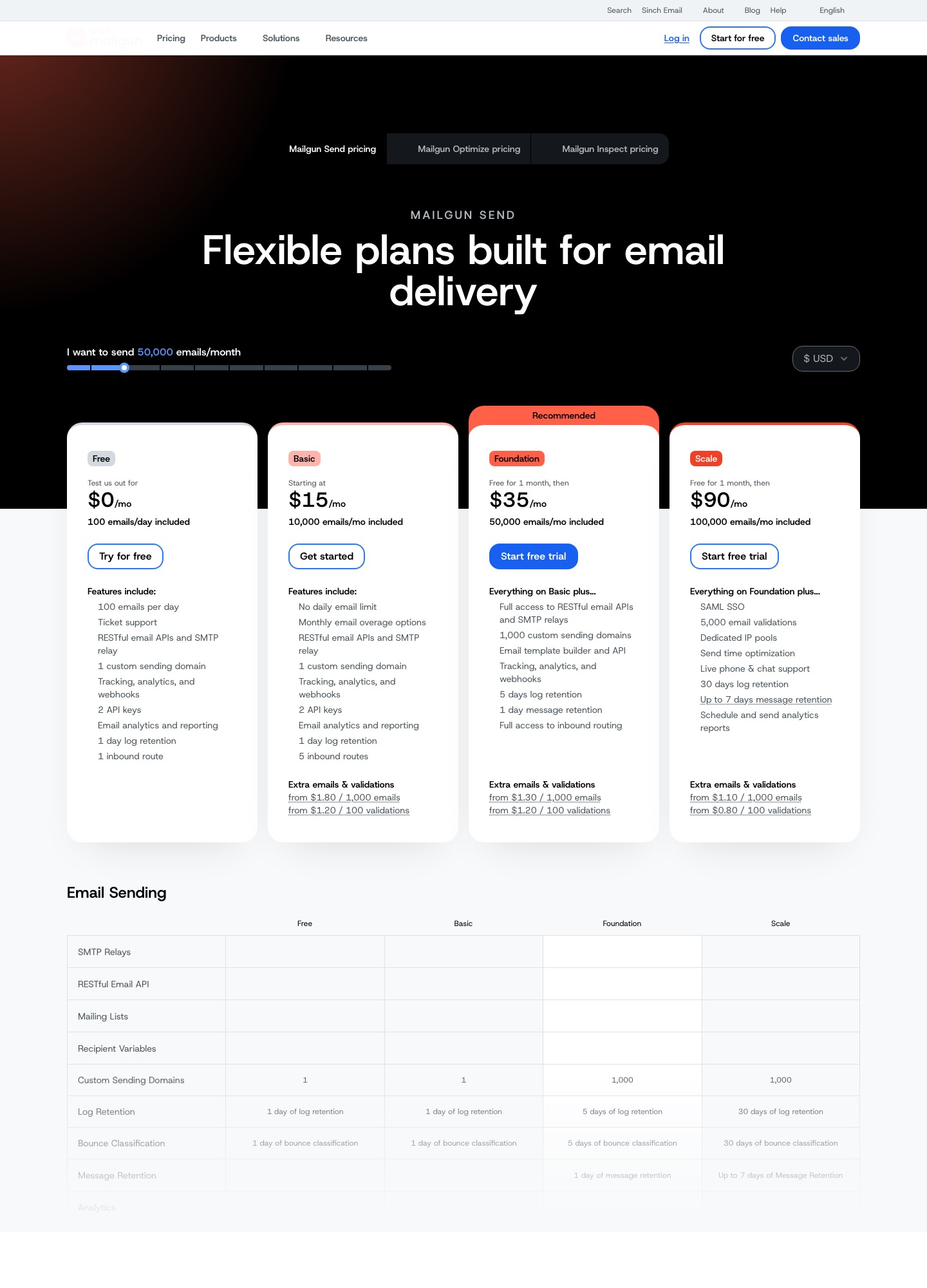
| Entry | Email API free trial: 100 emails a day for 60 days | Free: 100 emails a day, 1 sending domain, 1 day of log retention |
| Smallest paid plan | Essentials, starting at $19.95 a month (50,000 to 100,000 emails band) | Basic, from $15 a month for 10,000 emails |
| Mid plan | Pro, starting at $89.95 a month (100,000 to 2,500,000 emails band) | Foundation, $35 a month for 50,000 emails, free for the first month |
| Top listed plan | Premier, custom pricing | Scale, $90 a month for 100,000 emails, free for the first month |
| Marketing product | Marketing Campaigns: free plan, then Basic from $15 and Advanced from $60 a month | None named on its pricing page |
| Dedicated IP | 1 included on Pro and Premier | One included with Foundation at 100k and on Scale; extra IPs $59 a month |
| Activity or log history | 3 days on Essentials, 7 days on Pro | 1 day on Free and Basic, 5 on Foundation, 30 on Scale |
SendGrid figures come from its Email API pricing page and Marketing Campaigns pricing page. Mailgun figures come from its pricing page and the dedicated IP answer in its FAQ.
Two products under one name versus one product
SendGrid's pricing is split across two pages. The Email API page covers transactional sending, with a plan selector that runs from under 3,000 emails to 5,000,000 and beyond. The Marketing Campaigns page prices a different thing, contacts you store and campaigns you send, with design and code editors, segmentation, A/B testing, signup forms and, on some plans, automation. That is the "bundle": one login, one vendor, two meters.
Mailgun's page is about sending. It lists SMTP relay, a RESTful API, recipient variables, inbound routing and email validation, and its FAQ makes the scope plain: "There's no send button in Mailgun." If your marketer expects to log in, pick a segment and press send, Mailgun is not that product. If your engineers expect one sending service with predictable monthly tiers, it is simpler to reason about than a two-meter account.

What the free tiers actually give you now
Older write-ups of this matchup describe SendGrid as the one with a free plan that never ends. The Email API page today leads with "a free SendGrid Email API trial" that sends 100 emails a day for 60 days. After that you move to a paid plan. The standing free allowance sits on the Marketing Campaigns page, which says you can store up to 2,000 contacts and send 6,000 emails a month, including A/B testing, signup forms and automation. So a newsletter-sized list can stay free at SendGrid, while a pure transactional app cannot.
Mailgun's Free plan is the reverse shape: 100 emails a day with no stated expiry, one custom sending domain, two API keys, one inbound route and one day of log retention. The paid plans Foundation and Scale each begin "free for 1 month", and the FAQ says paid plans offer 30-day trials. For a side project that sends a few hundred transactional messages a day, Mailgun's free plan is the longer-lived of the two. For a hobby newsletter with 1,500 subscribers, SendGrid's contact-based free plan is.
Cost at 10,000, 50,000 and 100,000 emails a month
At 10,000 emails, SendGrid's Email API selector has no listed price to quote: it steps from under 3,000 to 50,000. Mailgun lists Basic at $15 a month with 10,000 included. At 50,000 emails, SendGrid lists Essentials "starting at $19.95", Mailgun lists Foundation at $35. At 100,000 emails, Mailgun lists Scale at $90, while SendGrid's two bands touch at that number (Essentials runs 50,000 to 100,000, Pro starts at 100,000 from $89.95), so read the selector's exact figure for your feature set.
Mailgun's own tiers hide a break-even worth knowing. Basic charges "from $1.80 / 1,000" extra emails, so 30,000 emails on Basic is $15 + 20 × $1.80 = $51. Foundation at $35 includes 50,000 and is cheaper from about 21,000 emails a month ($15 + 11.1 × $1.80, roughly $35). Foundation's overage is "from $1.30 / 1,000": at 100,000 emails that is $35 + 50 × $1.30 = $100, which is more than Scale's flat $90. The practical rule on Mailgun is to move up a tier before the overage line gets long. SendGrid's page points at the same habit: "If you're regularly pushing your limit, upgrading to the next tier usually beats paying overages."
SendGrid's page gives no overage rate of its own: it says taxes and overages may apply and links to a separate overage-rates article. Read that article before you size a plan to your average month rather than your busiest one.
Shared or dedicated IP
Mailgun's FAQ separates the two clearly: some customers are fine on shared IPs, others want dedicated ones for control over reputation. It says one dedicated IP is included with the Foundation 100k plan and on Scale, and that extra IPs are $59 per IP per month. Its feature table shows dedicated IPs accessible at 50,000 emails and included at 100,000 and above, and Scale adds dedicated IP pools.
SendGrid puts dedicated IPs in the plan itself. Pro and Premier each include one, with the option to buy more, and the page lists dedicated IP pooling and automated warm-up among its deliverability features. The practical consequence: at the Essentials tier you are on shared infrastructure, and the jump to Pro is as much about getting an IP as about volume. Whether a dedicated IP helps depends on whether you send enough, steadily enough, to build a reputation of your own; below that, a shared pool maintained by the vendor is usually the lower-risk choice.
Receiving mail and webhooks
On the inbound side SendGrid documents an Inbound Parse webhook that parses incoming mail and its attachments and posts them to a URL you configure; its pricing page lists it among the analytics features. Mailgun's model is Routes: a route is a filter plus an action, evaluated in priority order, with forward(), store() and stop() actions. You define them in the control panel or through a Routes API. Route counts are plan-gated: 1 on Free, 5 on Basic, full access on Foundation.
For event webhooks, SendGrid counts endpoints per plan: 1 on the trial, 2 on Essentials and 5 on Pro and Premier. If you want separate endpoints for delivery events, abuse reports and your data warehouse, Essentials runs out quickly. Mailgun's page lists webhooks as a feature without a per-plan endpoint count, so check its docs for your setup.
Both vendors let you verify who is calling your endpoint. SendGrid's Event Webhook can be signed with a private and public key pair, with the signature in an X-Twilio-Email-Event-Webhook-Signature header, or protected with OAuth 2.0. Mailgun signs every POST with an HMAC-SHA256 digest of timestamp + token, using one account-wide Webhook Signing Key that is separate from your API key, and its docs suggest caching tokens to refuse replays. See SendGrid's Event Webhook security guide and Mailgun's Securing Webhooks page.
Templates
SendGrid's dynamic templates have versions, a Design Editor and a Code Editor, and you pass data in personalizations.dynamic_template_data, referenced from the template with Handlebars. The Pro plan adds testing for those templates. Mailgun lists an "Email template builder and API" from Foundation upward. If your templates come from MJML or React Email, either vendor takes compiled HTML; the difference is whether you want the vendor to store and version it.
Choose SendGrid if…
- Marketing and engineering share one vendor and you want a free contact-based starting plan for campaigns.
- You want a dedicated IP bundled into the Pro plan rather than priced as an extra, and EU data residency among the listed features.
- Your company already contracts with Twilio and would rather keep billing in one place.
Choose Mailgun if…
- You only need application email, inbound routing and optional address validation, with flat monthly tiers at 10,000, 50,000 and 100,000.
- Longer log retention matters for support work: 30 days on Scale against 7 on SendGrid Pro.
- You need US or EU hosting from one account, which its pricing page describes.
Moving from one to the other
Treat the move as four separate jobs. First, authenticate a sending domain with the new vendor and keep the old one live while both warm up. Second, export suppressions from the old account and import them before the first send, so bounced and unsubscribed addresses stay suppressed. Third, re-create each webhook with its new signing scheme, since a SendGrid signature check will not validate a Mailgun request. Fourth, rebuild inbound handling: an Inbound Parse hostname becomes a Mailgun Route, or the reverse. For the wider question of how this fits next to marketing mail, read transactional vs marketing email, and for the sender comparison most teams run next, see Postmark vs SendGrid. High-volume buyers may also want the notes on high-volume email.
FAQ
Does SendGrid still have a free plan for sending?
Its Email API pricing page describes a free trial of 100 emails a day for 60 days, with no credit card. A standing free allowance exists on the Marketing Campaigns side, where the page says you can store up to 2,000 contacts and send 6,000 emails a month. Mailgun's free plan has no stated end date: 100 emails a day, one sending domain and one day of log retention.
Which one is cheaper at 50,000 emails a month?
SendGrid's Email API page lists Essentials as "starting at $19.95" for the 50,000 to 100,000 band, and says exact pricing depends on volume and features. Mailgun lists Foundation at $35 a month for 50,000 emails, free for the first month. The SendGrid figure is a starting price, so read its plan selector at your own volume before treating it as a final bill.
Can either one receive email, not just send it?
Yes. SendGrid documents an Inbound Parse webhook that posts incoming messages to a URL you choose. Mailgun uses Routes, where each route pairs a filter with an action such as forward or store; its pricing page allows 1 route on Free, 5 on Basic and full access from Foundation.
How do I know a webhook really came from the vendor?
Both sign requests. SendGrid can sign the Event Webhook with a key pair and send the signature in the X-Twilio-Email-Event-Webhook-Signature header, or use OAuth 2.0. Mailgun signs each POST with an HMAC-SHA256 of the timestamp plus token, keyed with an account-wide webhook signing key, and says the same check covers event webhooks and Routes posts.